
Morphological Analysis Case StudyShape analysis case
Here we present a case study ofMorphological Analysis Case Studyour support involvingarea measurement, image analysis, and ImageJ analysis using leaf image data.
Morphological analysis is a method for quantifying features related to the shape of an object in an image. For example,area, perimeter, circularity, major and minor axes, aspect ratio, particle count, and contour informationcan be measured to organize differences that are difficult to judge visually as objective numerical data.
Stat Agent provides integrated support extending beyond simple image inspection, including image-data checks, scale setting, preprocessing, binarization, contour extraction, ROI measurement, conversion of measurement results to CSV, and saving images for reports.
Please note thatto protect privacy, portions of the title and text have been adjusted, and published images have also been processed.Thank you for your understanding.
Case Study: Leaf Morphology Analysis and Area Measurement (10 Sample Images)
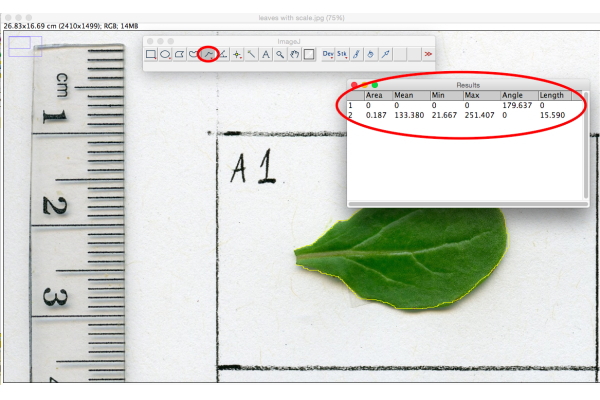
Step 1 | Receiving Image Data and Confirming Imaging Conditions
First, the client sends image data in formats that can be handled by ImageJ or similar image-analysis software, such as JPEG, PNG, or TIFF.
In morphological analysis, measurement accuracy is strongly affected not only by the operation of the analysis software but also byimaging conditions, background, shadows, scale information, and image distortion.
Therefore, before beginning image analysis, Stat Agent checks whether the target object is clearly visible, whether there is sufficient contrast with the background, and whether the information needed for scale conversion is included.
For leaf-area measurement, the following points are important during imaging.
1. Place the leaf on a white background, such as copy paper.
2. Take the image so that shadows do not fall on the leaf.
3. Photograph vertically from directly above to prevent distortion.
4. Include a ruler or another object of known length in the image.
5. Keep the shooting distance and angle reasonably consistent across images.
Confirming these conditions in advancemakes it easier to convert pixel-based measurements into actual units such as mm² or cm² and helps improve reproducibility of the image analysis.
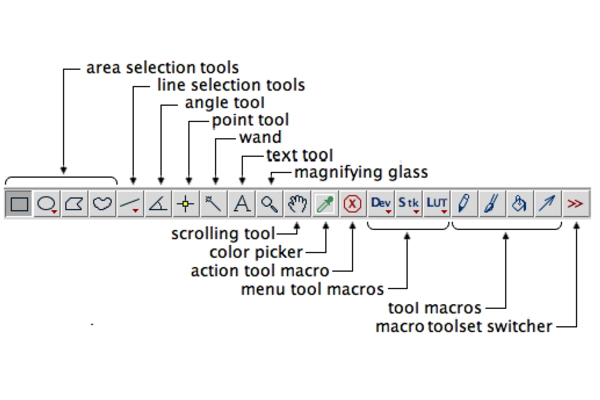 Step 2 | Scale Setting and Calibration in ImageJ
In this case study, ImageJ was used to measure leaf area.
To perform measurements in real-world units with ImageJ, it is necessary to establish the relationship between pixels and actual length using a ruler or scale bar visible in the image.
Calibration is performed through steps such as the following.
1. Use the Straight Line tool to draw a line along a ruler or other object of known length in the image.
2. Select Analyze → Set Scale.
3. Enter the actual length in Known Distance.
4. Enter the unit, such as mm or cm, in Unit of Length.
5. If the same settings will be used for multiple images, select Global.
This process allows the number of pixels in the image to be converted into actual length and area.
To prevent scale-setting errors from affecting measurement results, Stat Agent checksthe imaging conditions for each image, how the scale bar appears, and the positional relationship between the target object and the rulerwhile carrying out the work.
Step 3 | Image Preprocessing
After setting the scale, the image is preprocessed so that the leaf region can be extracted accurately.
If an image is measured while the boundary between the background and target remains ambiguous, the calculated area may be overestimated or underestimated.
Therefore, we perform grayscale conversion, brightness and contrast adjustment, noise reduction, and other preprocessing so that the outline of the target object can be identified more clearly.
Main preprocessing steps include the following.
1. Grayscale conversion: Image → Type → 8-bit
2. Brightness and contrast adjustment: Image → Adjust → Brightness/Contrast
3. Check the image to ensure a clear boundary between the background and leaf.
4. Check for the effects of noise and shadows when necessary.
Carefulimage preprocessingimproves the accuracy of subsequent binarization and contour extraction.
Step 4 | Binarization and Extraction of the Target Region
After preprocessing, binarization is performed to separate the leaf from the background.
Binarization converts an image into two values, such as black and white, so that the object to be measured can be distinguished from the background.
In ImageJ, binarization can be performed as follows.
1. Select Image → Adjust → Threshold.
2. Adjust the sliders so that the leaf region is selected appropriately.
3. Confirm that background areas are not included in the target region.
4. Click Apply to apply the binarization.
Because the measured area can change depending on the threshold setting, we carefully adjust the threshold while checking the condition of each image.
Stat Agent does not rely solely on AI or automated processing. Instead, wevisually check the object's contours, background contamination, missing regions, and the effects of shadowswhile proceeding with the analysis.
Step 5 | Contour Extraction and Region Measurement
After binarization, the leaf contour is extracted and the region to be measured is defined.
When necessary, functions such as Process → Binary → Erode, Dilate, and Options are used to adjust irregular contours and small amounts of noise.
Analyze → Analyze Particles is then used to measure the area, perimeter, and other properties of the target region.
Main checks include the following.
1. Whether noise has been included in the target region.
2. Whether part of the leaf has been omitted from the extracted region.
3. Whether unnecessary regions touching the image boundary are included.
4. Whether required measurements such as Area and Perimeter are output.
5. Whether the units, such as mm² or cm², match the calibration settings.
This process provides an objective numerical measurement of leaf area.
When required, we can also measure perimeter, circularity, major axis, minor axis, aspect ratio, and other features in addition to area.
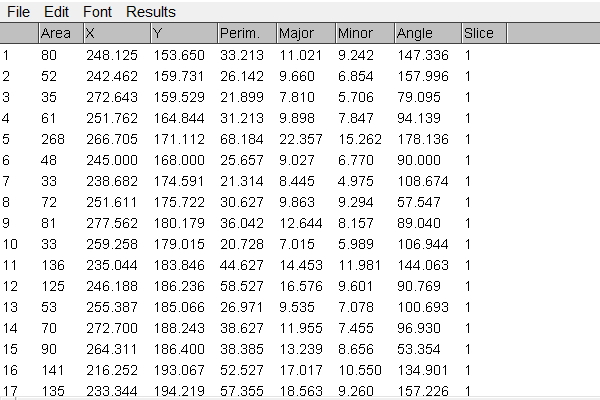 Step 6 | Reviewing and Saving Measurement Results
After measurement is complete, we review the results table and check for implausible values.
The results table displays items such as Area and Perimeter. If the scale has been set correctly, area is output in real-world units such as mm² or cm².
Deliverables can be saved in formats such as the following.
1. CSV file of measurement results
2. Summary table convenient for review in Excel
3. Binarized images
4. Images with ROIs
5. Images allowing comparison before and after analysis
When image-based reporting is required, we also save binarized images and images with ROIs so that the basis for the measurements can be verified.
Step 7 | Final Review and Delivery
Finally, we check whether any images could not be measured, whether the number of samples matches the number of measurement results, and whether file names correspond correctly to measurement data.
In this case study, leaf-area measurements were performed on 10 sample images and the measurement data were delivered by email.
Stat Agent accepts a wide range of consultations regardingIn addition to the numerical measurements, we also focus on organizing deliverables so that they are easy to recheck and easy to use in research materials and reports.
Through this workflow, Stat Agent provides integrated support formorphological analysis, image analysis, ImageJ analysis, area measurement, contour extraction, and particle analysis.
Before production begins, we carefully confirm the number of images, measurement items, type of target object, imaging conditions, delivery format, and whether a report is required.
Standard delivery:3–5 days
Expedited delivery:Delivery within 1 day may be available
* Detailed customization is also available for cell images, particle images, agricultural-product images, construction-material images, color analysis, particle-size distribution, circularity measurement, aspect-ratio measurement, and related tasks.
Contact Us
Over 30,000 consultations / Over 19,000 completed engagements. To date, we have supported consultations and requests involving analysis outsourcing, statistical processing, questionnaire surveys, marketing support, and more. Our experienced consultants carefully listen to your needs so that we can provide the right support. We offer prompt and accurate work at reasonable, accessible rates and are committed to delivering dependable results. Stat Agent team members across Japan will take responsibility for supporting you.
*We provide the profile of the person responsible for your project when you apply.
For outsourced analysis and statistical processing, choose Stat Agent.
*When order volume is high, it may be difficult to reach us by phone.
We apologize for the inconvenience. We respond in order of receipt, so if your matter is urgent, please contact us by
